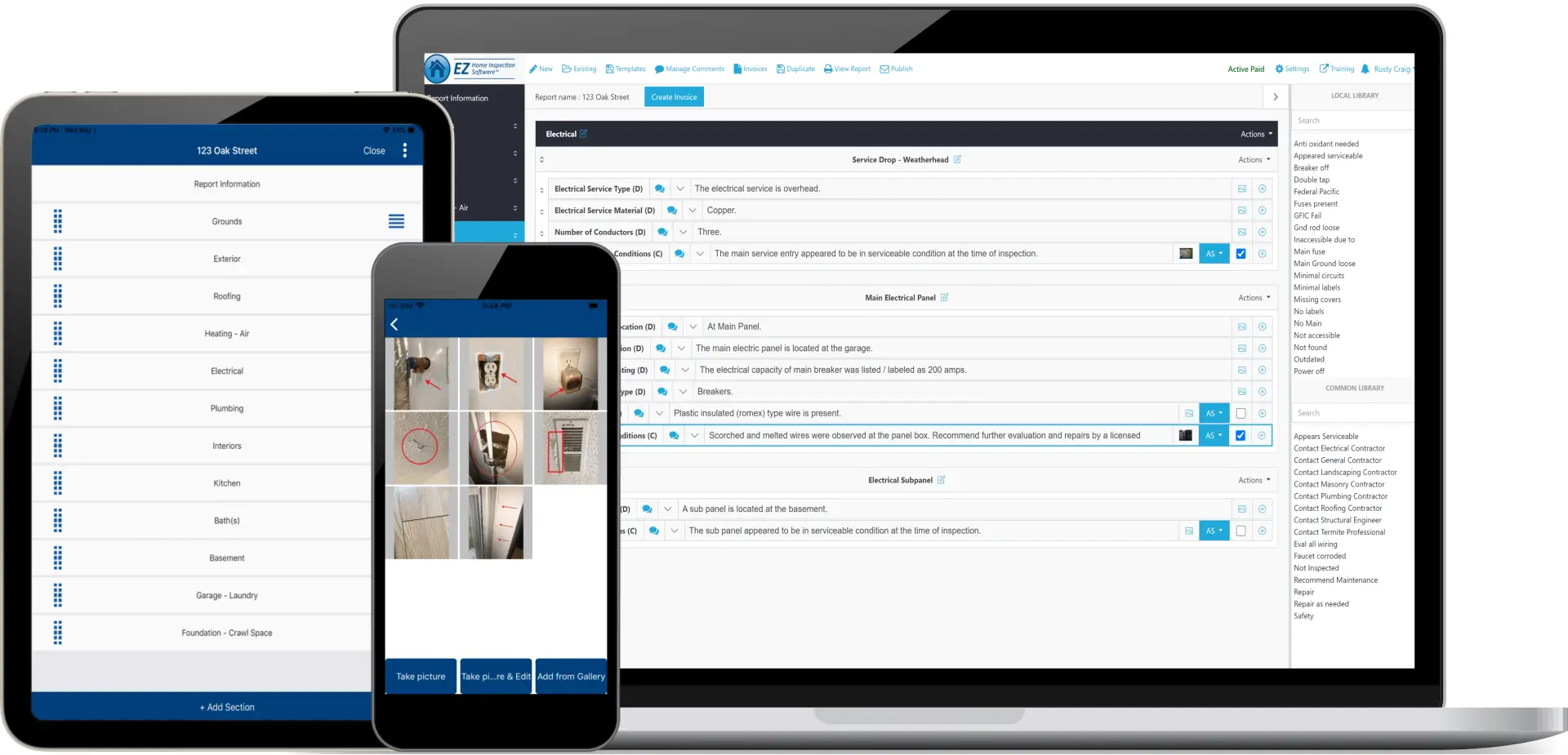
EZ Home Inspection Software
Create professional inspection reports with this easy
to use and powerful home inspection program
- Impress clients with great looking home inspection reports
- Increase productivity with time saving features.
- Create fully customized reports for virtually any type of inspection
- Fully Customizable
- Easily add and edit photos
- Create your own comment library or choose from over 2,000 pre-typed home
inspection comments to use - Save and re-use your own report templates
- Includes a report summary page (optional)
- Ideal for residential, commercial, mold, termite or any other type of inspection
- Create unlimited home inspection reports to print or email to clients
- Trusted affiliate of ASHI and InterNACHI
- Same day download
- Free Home Inspection Marketing guide included!
|
Now compatible with handheld
Tablet PCs!* |
![]() |

- EZ Home Inspection Software is a great product at an affordable price. I could not be happier.
Len B. -- Atlanta, GA - I used your home inspection software for the first time today at a live inspection, and let me say that everything worked perfectly. This truly is a great, easy to use, and totally customizable piece of software. Thank you.
Hector A. -- Buford, GA - Thank you so much for all the help and support you gave us. Your home inspection software is wonderful and easy to use. I would recommend EZ Home Inspection Software.
Sandra G. -- Ontario, CA - I love your home inspection software. I have used different programs down through the years. None compare to yours. Thank You.
David M. -- CHI , CMI -- Milton, FL - I have found your home inspection program versatile, easy to learn, and easy to modify and use. The video instruction that accompanies the program is very effective. Whenever I've had questions, Rusty has been right there with support. Can't ask for more than that!
Ed Newman -- Alamogordo, NM - I have been using your home inspection software for about a month. It was easy to set up and use. The price was very affordable. The features match or exceed those of more expensive programs I have reviewed in the past.
Chuck J. -- Denver, CO - EZ home inspection software is very easy to use and customize. Good customer service as well. Thank you.
Nate E. -- Windsor, Ontario Canada

How to select a home inspection software that’s right for your business
Like all industries, the home inspection market has changed due to advances in technology. In the era of digital information, real estate agents, home owners, and future home buyers expect a home inspection report that is typed, easy to read, and includes color photos. By using a high quality software application you can create professional reports, save time, and gain a significant advantage over your competition.
Yet, not all software applications will deliver the same return on value. When assessing and selecting a new software application to produce reports for your clients, it is important that you look at three main areas: available features, manufacturer reliability, and pricing. Through review of these components you can determine which of the many available applications will best meet your needs.
Home Inspection Software Features
First, let’s take a look at the software’s features. This category of features includes functions that are involved in the process of creating reports efficiently.
Report Customization Options
Every inspector uses a slightly different inspection process to record and document findings. It is important that your inspection software does not create difficulties by making you conform to one method of reporting selected by the application developer. Each home inspection application you review should provide the ability to customize the report to suit your own process and methods of reporting.
Templates
Not all inspections are the same and the software must be adaptable to support a number of inspection types and report options. Saving and reusing templates for various types of reports will save you time and your business money as you can quickly create a default layout and inclusion of required data points for each type of inspection you offer. This is a critical feature that you should ensure is in any software application under consideration.
Library of Comments
Often the same phrase is used repeatedly in home inspection reports. By saving these comments into a library of options that can be selected for insertion into any report, you will be more efficient and more accurate as you eliminate opportunities for spelling and wording mistakes. Several minutes of typing can be turned into one or two click of a mouse with a proper comment library feature.
Once you’ve identified the features you prefer, it is time to assess the capability provided in the reports and the options for look and feel that will wow. The home inspection report is the deliverable that clients will use to judge you and your company. For this reason, the report must be clean, easy to read, and contain color photos. Key features to test and understand are customization options, summary page, and photo management.
Summary Page
A key feature of the home inspection report for clients is the summary page. Your software should have the option to automatically create a summary page based on inspection findings and add it at the beginning or end of the final report.
Photo Management
Photographs of inspection findings, especially adverse findings, go a long way to making the report easily understood. Look for features that allow not only photo inserts in context-specific locations, but also include the ability to add arrows and annotations directly to the pictures in the report.
Report Distribution Features
If you’re used to providing a hand written hard copy of the inspection report you may want to print a hard copy to give to the client once you start using software. Many inspectors have completely eliminated paper waste by simply emailing a PDF report to their clients. A good software program should allow you to either print hard copies or create electronic reports that you can email to clients.
Once all the discrete application features are assessed to identify those that are the most important, and thus worth paying for, one final area must be reviewed. It is essential that you identify the software’s ease of adoption and usability. If the application that offers the most useful features is badly organized and not intuitive to use, it likely will not add value to your business. Test each software package you are considering and judge how quickly and easily you can find the options and commands you need, determine how many clicks it takes to accomplish basic tasks, and now think about using it every day for completion of your home inspection reports. This final test will help you narrow down your choices to only those that will be usable the first time you need them.
Manufacturer Reliability
When assessing a software manufacturer for reliability, it is most important to review and understand the organization’s support model. Check for available tools that will help you learn the software including web-based tutorials or videos. Analyze the options for more advanced support. Look for the ability to email for help or to call and speak with a support representative. Do not hesitate to contact the support channels as part of your assessment process to ensure you can rely on the manufacturer after you buy the product.
Pricing
Software applications for home inspections are available under a number of different licensing types including one-time purchase, monthly subscription, or pay-as-you-go. Each of these options has pros and cons associated with their use and vary widely in total cost.
One-time purchases are a good choice if you are certain of the application you prefer, you complete enough reports to offset the higher up-front costs, and you have the money available. When considering a one-time purchase it is important to understand what support is included after the purchase concludes and for how long it is available. In addition, outright purchases of software will require installation on your own computing equipment which will make backups of data your responsibility as well.
Monthly subscriptions offer a regular planned monthly payment for use of the software application. Frequently, these applications are web-based saving the need for extra computing equipment and potentially managing data backups as well. Monthly subscription pricing does not require large sums of money upfront, but does require an ongoing commitment and is typically much more expensive in the long run. Depending upon the specific contract agreement, the number of reports included in the base pricing may be limited. This could result in increased costs if not carefully monitored.
Pay-as-you-go pricing provides inspectors with low report volumes to utilize all the features of a high-end software application without large infusions of resources or long-term commitments. These can be a compelling option for new inspectors, but the costs will expand exponentially for more than a few reports in a given period. No matter what pricing model you select, there is not a standard price for this type of application as there are many available packages with differing features, functions, and contract requirements.
To determine which software application you should select, take the time to research for industry options and compare the leaders against one another. Carefully assess the features available and determine which of those offered will fill a business requirement, review the manufacturer support options and look for tutorials, online articles, and in-person technical support for catastrophic situations, and identify the pricing model that makes the most sense for your business goals. The right choice will be entirely dependent on your unique business circumstances, and with consideration of these areas will be easily identified.
|
|
|
|
|
Copyright 2012 EZ Home Inspection Software. All Rights Reserved.